A gift to the community
This is the first professionally-made Stream Deck profile released under the 6E Virtual name, and we're sharing it for free, a gift to the X-Plane community. It represents many hours of dataref research, in-sim testing, and custom artwork, and we wanted the first release to give something back rather than start behind a paywall.
Future profiles (other aircraft, other panels) are planned as paid releases, so we can keep dedicating the time this kind of accuracy takes. For now: enjoy this one on us.
What this is
A full-featured, purpose-built Stream Deck Plus layout for the FlightFactor 777v2, covering the MCP, radios and transponder, exterior lighting, overhead electrical panel, fuel system, and the Captain's EFIS control panel, all driven live from the aircraft's actual datarefs and commands via PilotsDeck, with custom leather-and-metal artwork designed to feel like a real extension rather than a generic button grid.
Every switch, dial, and annunciator on the deck reflects the real state of the aircraft in real time: lamps light when the sim says they're lit, toggle levers flip position when the switch is actually thrown in the cockpit, and the two rotary dials on the Plus turn continuously to drive real 777 selectors (ND MODE, ND RANGE, BARO, MINS, APU, and more) with correct end-stops.
What's included
- The Stream Deck profile package (
.ppp) — profile pages, custom artwork, and the Lua logic that talks to the sim - A one-click Windows installer that also checks for PilotsDeck and offers to install it if it's missing
- A bundled style font for the digital readouts (BARO, radio frequencies)
- A page-map README
Requirements
- Elgato Stream Deck Plus (8 keys, 4 touch-dials, touch strip)
- Stream Deck software 7.4 or newer
- PilotsDeck 0.9.4 or newer (the installer will offer to fetch this for you)
- X-Plane 12 with FlightFactor 777v2 installed
- In X-Plane, Settings > Network > Accept incoming connections must be enabled — PilotsDeck talks to the sim over X-Plane's native UDP interface, no third-party plugin required
Installation
- Run the installer and follow the prompts. If PilotsDeck isn't detected, it will offer to download and run the official installer for you.
- When the PilotsDeck Profile Manager opens, select your Stream Deck Plus and click Install.
- Restart the Stream Deck software once (quit and relaunch from the tray icon) so the plugin picks up the new images, scripts, and font.
- Load into the FlightFactor 777v2 and the profile will be ready on your deck.
What's on the deck
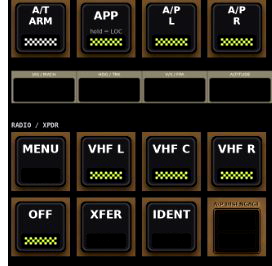
MCP — speed/IAS-MACH, heading, altitude, and vertical speed selectors with live readouts; LNAV, VNAV, FLCH, ALT HOLD, LOC, APP, HDG SEL/HOLD; both autopilot engage switches with disconnect bar; flight director switches; combined A/T arm; bank angle selector.
Radios & Transponder — COM1 active/standby frequency display with swap, tuned by real rotary dials; transponder mode selector across all five positions (STBY, ALT RPTG OFF, XPNDR, TA ONLY, TA/RA) with IDENT.
Exterior Lights (two pages) — beacon, nav, wing, and logo lights on lit annunciator switches; landing lights (L/nose/R), runway turnoff (L/R), taxi, and strobe on custom photographic-style toggle levers, each finished to match its real switch type (gunmetal landing-light levers, cream runway-turnoff levers, polished chrome taxi/strobe toggles).
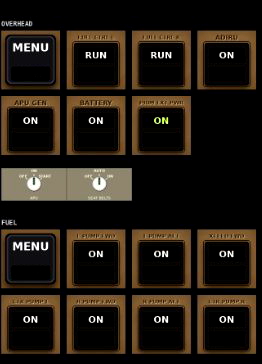
Overhead / Electrical — ADIRU, APU generator, and battery switches with correct amber/white annunciation; primary external power; APU selector (OFF/ON/START) and seat belts sign on the touch-dials.
Fuel — both fuel control levers (RUN/CUTOFF) with hold-to-confirm cutoff, all fuel pumps, and crossfeed.
Captain EFIS Control Panel — the full map-mode switch row (WXR, STA, WPT, ARPT, DATA, POS, TERR), FPV and MTRS toggles, MINS selector with reset, and a BARO panel with a dedicated STD push and IN/HPA unit key. ND MODE (APP/VOR/MAP/PLN) and ND RANGE (10 through 640) are driven by the Plus's rotary dials with correctly end-stopped, bidirectional stepping matched to the aircraft's actual selector positions — including a dedicated BARO preselect behavior so dialing out of STD lands exactly where you set it, the same way the real knob works.
A note on accuracy
Every command and dataref binding in this profile was verified against the FlightFactor 777v2's own clickzone data and confirmed in-sim, not guessed from a generic 777 template. Several behaviors (BARO/STD handling, ND MODE/RANGE synchronization) required custom Lua logic to correctly emulate how the real cockpit knobs behave, since the aircraft's autogenerated hardware commands don't always match 1:1 with the physical panel.
Support
This profile is provided as-is, free of charge. If you run into an issue, please leave a comment here on xplane.to with details (which page, which switch, what you expected vs. what happened) and we'll take a look.